grandMA3 User Manual Publication
Desk Lights
|
grandMA3 User Manual » System » Desk Lights
|
Version 2.3
|
This topic describes the setting of desk lights.
To learn more about color themes, see Color Themes.
To access the Desk Lights Color Theme menu:
- Press Menu.
- Tap Desk Lights & Color Theme.
- The Desk Lights Color Theme menu opens.
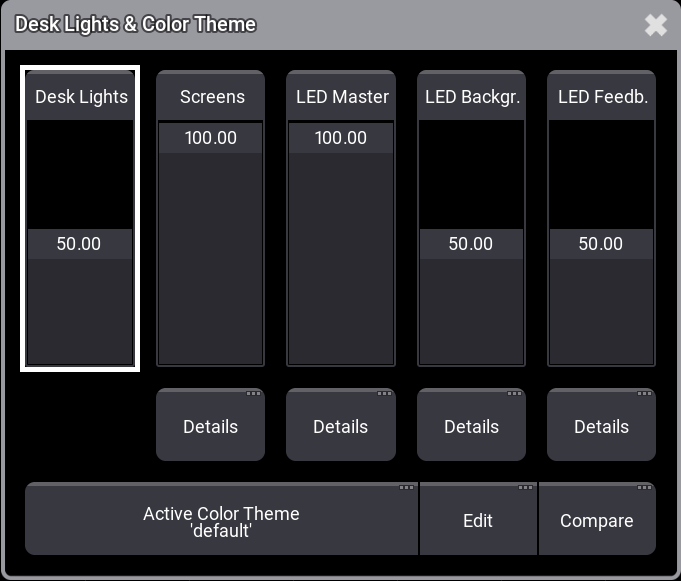
- Desk Lights:
Move the fader up or down to adjust the desk light intensity. - Screens:
Adjusts the overall brightness of all screens.- To adjust the brightness of individual screens, tap Details below the Screens fader. Then, move the respective screen fader up or down.

|
Restriction: |
| The Screen External fader currently has no function. |
- LED Master:
Adjusts the overall intensity of all LEDs.- To adjust the LED intensity of the individual elements, tap Details below the LED Master fader.
- LED Background:
Adjusts the overall LED background intensity, such as for encoders and keys.- To adjust the LED background intensity of the individual elements, tap Details below the LED Master fader.
- LED Feedback:
Adjusts the intensity with which the LEDs respond to input.- To adjust the LED Feedback intensity of the individual elements, tap Details below the LED Feedback fader.