grandMA3 User Manual Publication
Open the Help as PDF
|
grandMA3 User Manual » About the Help » Open the Help as PDF
|
Version 2.3
|
You can download PDF files of different versions of the manual as well as single topics.
Download Manual for a Software Version
A PDF version of the user manual is available for each version of the software.
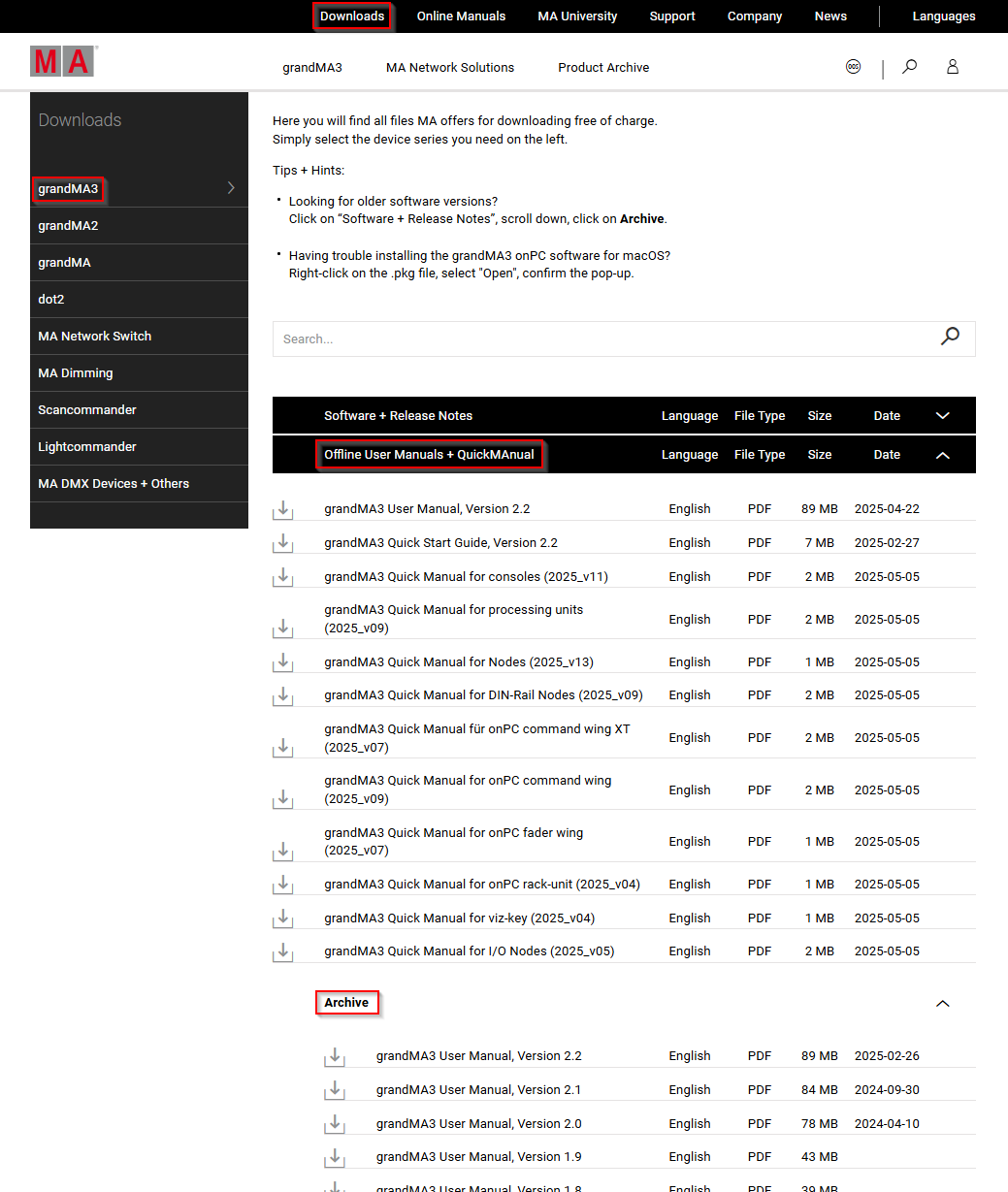
To download a PDF of the entire manual:
- Navigate to the Downloads section of the MA Lighting website: https://www.malighting.com/downloads
- Select a product family in the list on the left side.
- Click Offline User Manuals + QuickMAnual.
- Click Archive at the bottom of the list.
- Click on the version of the manual you want to download.
The PDF file is saved to your downloads folder.
Create PDFs in the Online Help
Download single topics from the online help as a PDF document to view them offline.
To download the contents of a topic as a PDF file:
- Click the printer icon (
 ) next to the topic title.
 - As destination choose Save as PDF.
- Click Save.
The topic PDF is saved to your downloads folder.