grandMA3 User Manual Publication
Quick Start
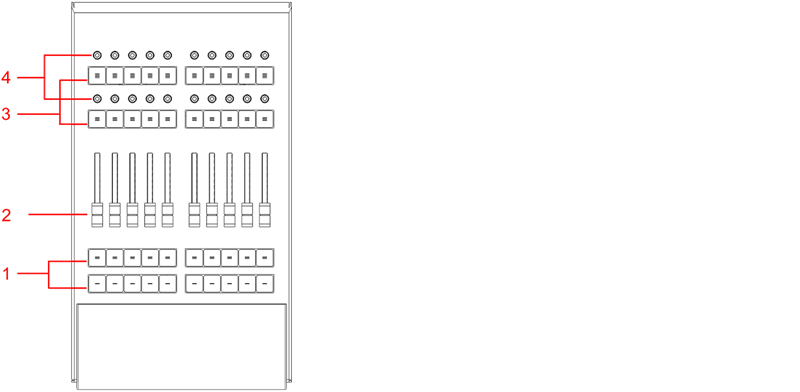
- Executor buttons 101-190 + 201-290
- Executor faders 201-290
- Executor buttons 301-390 + 401-490
- Executor knobs 301-390 + 401-490
For more information about executors, see Executor elements.
Connect and Power Up the Device
- Unpack the device.
- Remove the packaging and cushioning material.
- Place the device indoors on a stable surface.
- Download the grandMA3 onPC software on www.malighting.com
- Install the software on your PC or laptop. For minimum requirements see System Requirements grandMA3 in the grandMA3 user manual.
- Connect the grandMA3 onPC fader wing with your command wing XT, PC or laptop using a USB cable.
- Start the command wing XT, PC or laptop .
- Switch on the grandMA3 onPC fader wing:
-Insert the IEC connector into the corresponding jack.
-Connect the main power plug.
-Turn on the power switch:
-Set it to position I.
-The power switch lights up in red.
Turn off the grandMA3 onPC fader wing
To turn off the grandMA3 onPC fader wing set the power switch to position 0.

|
Important: -Show data is only saved in the grandMA3 onPC software. -For updates use the grandMA3 onPC software. |
|
|
Important: You can disconnect the grandMA3 onPC fader wing using the grandMA3 onPC software. The DMX output will then be interrupted immediately. |
Different Combinations
| Device | Connected To | Parameters |
|---|---|---|
| grandMA3 onPC fader wing + | PC/laptop | 4 096 |
| grandMA3 onPC fader wing + | PC/laptop + grandMA3 onPC 8/4/2Port Node | 4 096 |
| grandMA3 onPC fader wing + | PC/laptop + grandMA3 processing unit M/L/XL | 4 096 |
|
|
Important: Independent of the devices connected to the grandMA3 onPC software, the number of parameters can only reach a maximum of 4 096. |
For more information see: Expand the Amount of Parameters topic