grandMA3 User Manual Publication
Displays in grandMA3 onPC
|
grandMA3 User Manual » Workspace » Displays in grandMA3 onPC
|
Version 2.3
|
The Displays pop-up allows toggling, showing, or hiding all 7 screens on the grandMA3 onPC.
To open the Displays pop-up on the grandMA3 onPC, tap  in the control bar.
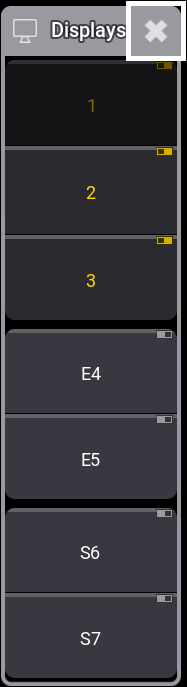
Displays can be toggled On or Off by tapping the relevant buttons.

|
Restriction: |
| Display 1 cannot he toggled. It is always On. |
The number and the indicator turn yellow on the displays that are shown.
The pop-up can be closed by tapping the icon again in the control bar or by tapping the X in the upper right corner of the pop-up.
For information on the location of menus, see Change Menu Locations.