grandMA3 User Manual Publication
Quick Start
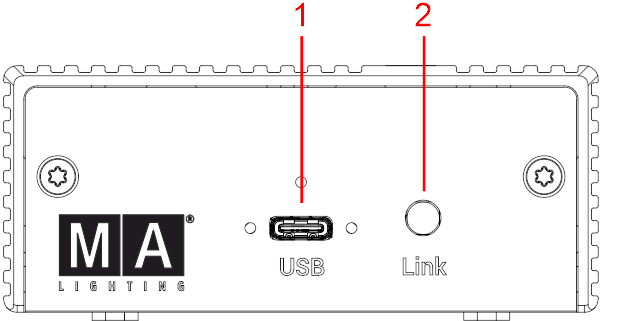
- USB port type C
- Link LED
LED statuses:
| LED
|
Status |
Troubleshooting |
|---|---|---|
| Off permanently |
No power supply. The device is not receiving power.
|
Check the USB connection and ensure the PC or power source is on. |
| Flashing three times |
Device is powered on, but no USB host is detected.
|
Check the USB C cable for damage. Ensure the workstation is powered on and functioning.
|
| Slowly blinking |
Device is powered on and USB host is detected. No connection to grandMA3 onPC. |
Start the grandMA3 onPC software on the workstation.
|
| On permanently |
Connection to grandMA3 onPC successfully established.
|
No action required.
|
|
Fast blinking |
Connection to grandMA3 onPC was previously established but is now lost. DMX-Hold may be active if configured. Blinking does not indicate transmission of DMX data. |
Check the grandMA3 onPC software status. Verify USB connection and DMX settings. For more information see DMX Port Configuration in the grandMA3 User Manual. |
Start-Up
- Unpack the device.
- Remove the packaging and cushioning material.
- Connect the grandMA3 onPC DMX-key via one of the USB-C cables to a PC or laptop with installed grandMA3 onPC software.
- To power off the grandMA3 onPC DMX-key, disconnect the USB-C cable.
- To download the current version of the grandMA3 onPC software, go to www.malighting.com.