Timing Masters
|
grandMA3 User Manual » Masters » Timing Masters
|
Version 2.4 |
There are 50 different timing masters.
They can have values between 0 seconds and 10 seconds.
Timing masters can be set for playback timings instead of a numeric value. They can also be used for timings in combination with playback commands.
The following properties can be set to a timing master:
- Timings in sequences: CueIn Fade, CueOut Fade, CueIn Delay, CueOut Delay, Feature Group Fade, and Feature Group Delay
For more information about using timing masters in sequences see Cue Timing – Timing Masters. - Playback timings in Preferences and Timings:
To show and edit these default playback timings, go to Menu - Preferences and Timings - Timings.
For more information about default playback timings see Cue Timing – Playback Timing.
To set a timing master, edit the value of one of these properties and select a timing master in the calculator.
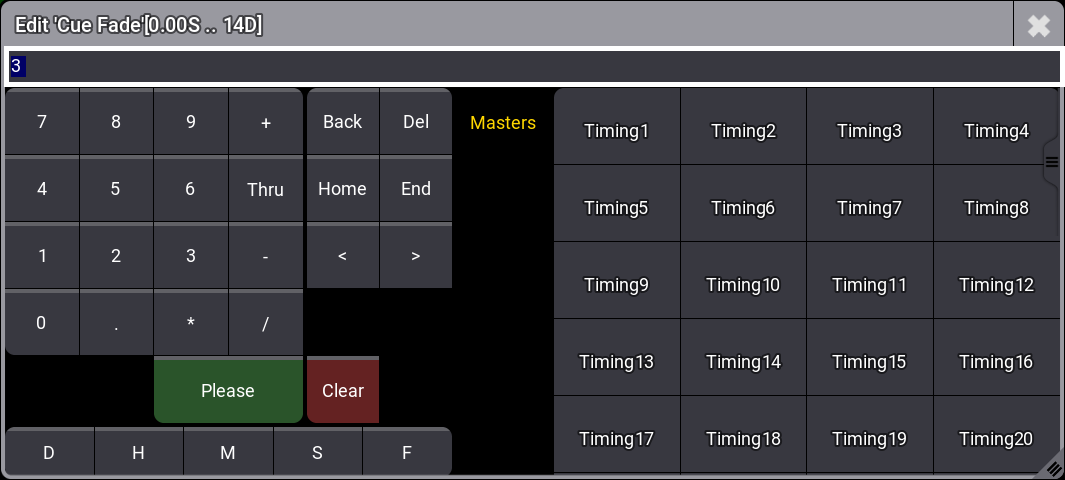
To set different timing masters for in and out timings when Condensed Timing is enabled in the sequence sheet, type manually into the Cue Fade or Cue Delay calculators. For example, Timing1/Timing2 (no spaces between name and number).
To use a timing master in combination with playback commands, type the timing master instead of a numeric value.
Example:

|
User name[Fixture]>Goto Cue 5 Fade "Timing5" |
Timing masters can be assigned to executors. Read more about assigning masters to executors in the Assign Object to an Executor topic.
To change the name of a timing master or add a scribble, an appearance, a note, or tags go to the Edit Setting tab of the assign menu or use the Label keyword.