|
grandMA3 User Manual » Generator - Random
|
Version 2.5 |
Generators are objects that allow a dynamic absolute value generation for special purposes, like the randomization of absolute values on attributes.
Random
The generator type Random allows randomization of absolute values of attributes in different ways. Randoms are organized in the Generator pool. The Generator pool is part of the data pools. To address the generator pool objects, use the Generator keyword.

The key to randoms are the different variance values. Without the variance, it would be a very simple phaser, but the variance allows the different values to vary between each "loop" of the random.
Randoms are called into the programmer and affect the defined attributes for the selected fixtures. This programmer information can be stored in presets or cues.
Randoms can only affect the values on the absolute layer.
The random generators have many settings that affect how the attribute output is randomized. This is a short description of all the different settings:
-
Attribute:
This is the attribute affected by the random Generator. - Speed Master:
One of the 15 speed masters or the BPM master can be assigned as a speed controller. -
Speed:
Defines the speed of the loop between the low and high values.
-
Speed Variance:
Defines how much the Speed value may differ when the generator is running. -
Phase:
Defines the start point within the loop.
-
Phase Variance:
Defines the range of Phase values randomly selected for each individual fixture using the generator. -
Low:
Defines the low end of the loop, as a percentage of the total DMX range of the attribute.
-
Low Variance:
Defines the range of Low end values which will be randomly selected from for each individual fixture each time through the loop. Meaning, the same fixture may output a different low value each cycle. The Low Variance will only increase the possible Low value; it will never make a fixture output a value below the Low parameter. -
High:
Defines the high end of the loop, as a percentage of the total DMX range of the attribute.
-
High Variance:
Defines the range of High end values which will be randomly selected from for each individual fixture each time through the loop. Meaning, the same fixture may output a different high value each cycle. The High Variance will only decrease the possible High value; it will never make a fixture output a value above the High parameter. - Attack:
Defines the size of the linear transition towards the High value.
- Decay:
Defines the size of the linear transition towards the Low value. -
Ratio:
Defines the ratio of how long fixtures will stay at the Low or High value each cycle.
-
Ratio Variance:
Defines the range of Ratio values which will be randomly selected for each individual fixture each time through the loop. -
Speed Once:
When Speed Once is set to Yes, the Generator Speed for each fixture will be determined once when the Generator starts running, and will stay at that speed even if the Speed Variance parameter is above 0.
Additionally, if the Speed or Speed Variance parameters are modified while the Generator is running, these changes will not take effect until the Generator is restarted.
When Speed Once is set to No, the Generator Speed will recalculate every loop if you are using Speed Variance, and will also change immediately if you modify the Speed or Speed Variance while the Generator is running. -
Phase Once:
When Phase Once is set to Yes, the Generator Phase for each fixture will be determined once when the Generator starts running, and will stay at that phase even if the Phase Variance parameter is above 0.
Additionally, if the Phase or Phase Variance parameters are modified while the Generator is running, these changes will not take effect until the Generator is restarted.
When Phase Once is set to No, the Generator Phase will recalculate every loop if you are using Variance, and will also change immediately if you modify the Phase or Phase Variance while the Generator is running. -
Random Start:
When Random Start is set to No, the random will always start with all parameters at their same individually-calculated values per fixture, with any Variance proceeding from there. This might be useful for environments that need a predictable start followed by randomness.
When Random Start is set to Yes, the initial individually-calculated Random Parameter values for all fixtures will be different every time the Random is started again.
These settings are applied to a Random Channel. A Random can have multiple Random Channels.
Create a Random Generator
Randoms can be created by editing an empty pool object. This opens the Generator Random Editor.
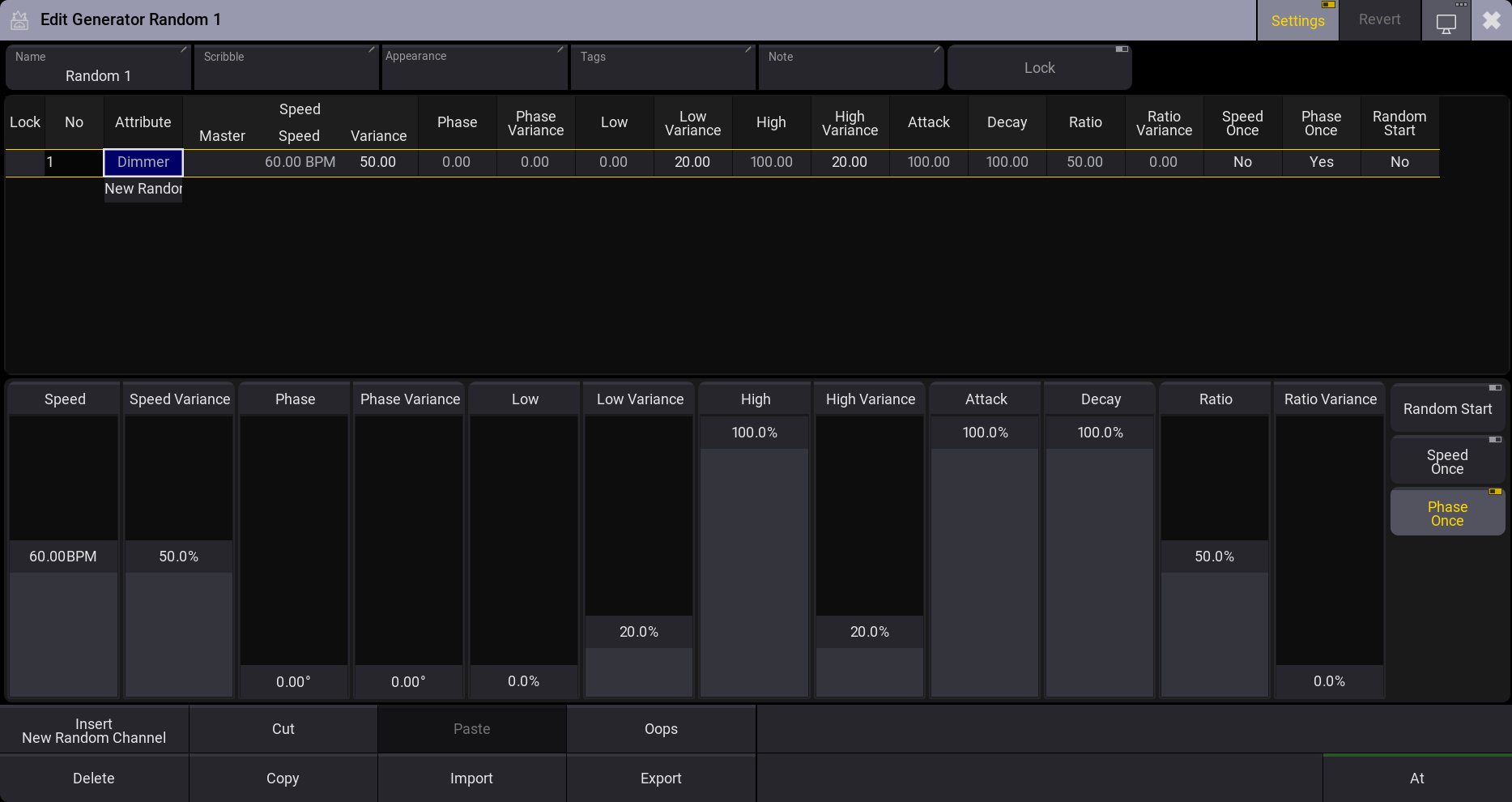
The top part of the editor contains a sheet area where the Random Channels are rows, and the different settings are columns.
The bottom part has on-screen faders that can be used to edit the selected rows.
The values can be edited on the sheet and the fader parts.
There are buttons at the bottom for normal actions like Cut, Copy, Paste, etc. This includes an At button, which can be used to apply the random values to the current selection.
There is a special encoder bar when the editor has focus.

This encoder bar also allows editing the generator values.
The editor's title bar has a button called Revert. Tapping this discards all current changes to the valid values when the Generator editor was opened.
Using a Random
Random Generators are not dependent on specific fixtures. They affect attributes. Having a fixture selection and tapping a Random pool object applies the Random object's values to the attributes of the fixtures on the absolute layer. These are programmer values that can be stored or used as live playback.
The Generator keyword can also be used to apply Random Generators.