grandMA3 User Manual Publication
Notes
|
grandMA3 User Manual » Notes
|
Version 2.5 |
Short notes can be used to add information in form of written text to objects, such as in Presets, Groups, Macros, Cues, or Fixture Types. The notes are written in a text editor. The text editor is accessible via a Note button in the corresponding object or a Note cell. See examples below.
- Notes can be added to pool objects via the label command. For more information, see Label pool objects.
- Notes can be added via the note keyword, too. For more information, see Note keyword.
- Notes are part of the object information and can be seen and edited from the info window. For more information, see Info window.
Examples
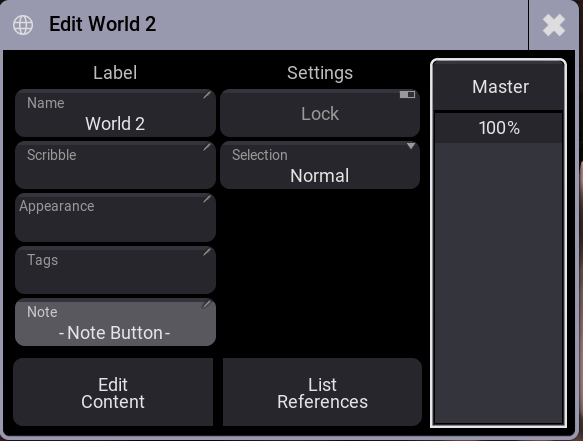
To enter the note button in a world pool:
- Add Window - Data Pools - World.
- Use the swipey command on world pool object 2 and tap Edit Setting.
- Tap Note. The text editor opens.
To enter a note cell in the patch:
- Menu - Patch.
- Two-finger tap the Note cell of a fixture configuration line. The text editor opens.

To learn more about notes in particular, continue with the following subtopics and their examples.