grandMA3 User Manual Publication
Connector Pin Assignment
|
grandMA3 User Manual » Device Overview » Connector Pin Assignment
|
Version 2.3
|
This page gives an overview of all connectors and their respective pinouts.
XLR Connectors

For more information, see Connect Desk Light.
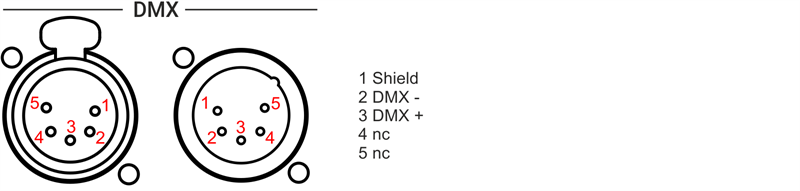
For more information, see Connect DMX.

For more information, see Connect LTC.

For more information, see Connect Audio In.
D-Sub Connectors
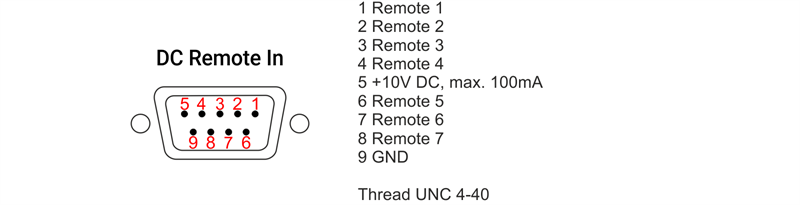
RCA Connectors

For more information, see Connect Sound Out.
1/8" (3.5mm) Jack Sockets

DIN Connectors

For more information, see Remote In and Out
Euroblock Terminals






For more information, see the corresponding quick manual, for example, grandMA3 Quick Manual I/O Nodes Installation.
To show the rear panel connectors on the letterbox screens on grandMA3 light and full-size:
- Press Menu and then tap Connector Configuration.
- To show the rear panel connector, enable Show Connectors button.
or use the command line:

|
User name[Fixture]>Menu "ConnectorView" |