UPS Battery
|
grandMA3 User Manual » Device Overview » UPS Battery
|
Version 2.3
|
The grandMA3 full-size, grandMA3 light, and their CRV versions have a rechargeable lithium-ion battery for an uninterrupted power supply (UPS).
The purpose of the battery is to enable to save the show file and shut down the console in case of a power loss.

|
Restriction: |
|
Do not use the battery to bypass the console for a longer period! Do not move the console around while in UPS mode!
|
In case of a power loss:
- A Power Loss pop-up appears on every screen and command screen, depending on the console type.
- The power status icon in the command line turns red.
Power Status
There is an indicator of the power status on the right side of the command line and in the Message Center.
Status indications include the following states:
 Power is connected and the battery is full.
 Power is connected and the battery is not full (and recharging).
 (Pulsating) Power is disconnected and the battery is discharging.
 Indicates a power disconnection for a station in a session. For example, when a grandMA3 onPC station is connected to a console and the console has a loss of power, the icon turns yellow on the grandMA3 onPC station.
 The battery icon is crossed when the station has no battery, for example, grandMA3 onPC.
Battery Status Pop-Up
Tap the power status indicator to open the Battery status pop-up.
The pop-up could look like this:
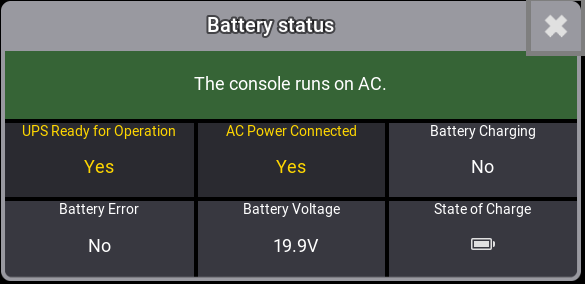
The Battery status pop-up displays multiple relevant metrics about the battery as well as A/C power.
Power Loss Pop-up
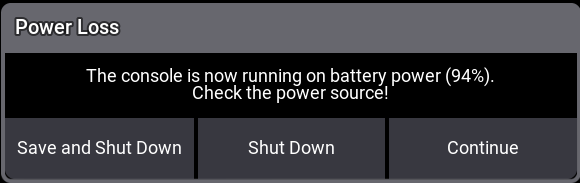
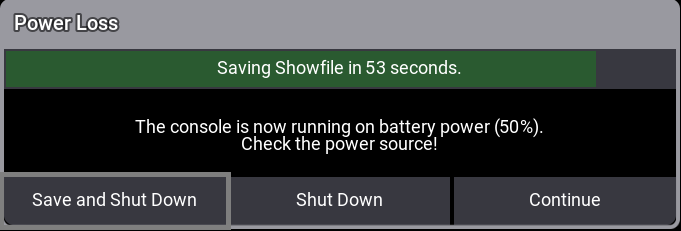
While this pop-up is open, the percentage in the parentheses (X%) continuously decreases. The percentage in the parentheses is linked to the power status of the battery.
In the pop-up window, three commands are available to tap:
Save and Shut Down: Saves the current show file and shuts down the console properly.
Shut Down: Properly shuts down the console without saving the show file.
Continue: The console continues running on battery power. Further Power Loss pop-ups appear during the battery discharge process. When continued, the console will automatically shut down reaching (0%). The console reboots automatically when power supply is back.

|
Hint: |
|
To reboot the console after a proper shutdown, press Power when the power supply is back.
|
Battery Status Information
To avoid deep discharge, recharge the battery to 3/4 capacity ( ) once a year.
- To check the battery status, switch on the console, boot it up, and mind the status icon of the UPS battery in the command line. For more information, see Message Center.
Battery Transportation
-
Follow the transportation regulations for each country. If it is necessary to discharge the battery at a level of 1/4 capacity (
 ) for air cargo, run the console in UPS mode until the battery voltage reaches 17 V. For more transportation information, see Transport in the grandMA3 Quick Manual.
Software Check
The battery function of the grandMA3 console should be checked before every major show programming or at least every two months.
To check the battery:
- Power up the grandMA3 console and wait until the battery is fully charged.
- Load a new show file.
- To disconnect the console from the power, flick the power switch on the back of the console to off (0). The console now runs on battery.
- The Power Loss pop-up appears. To proceed with the battery check, tap Continue.
-
Let the console run on battery for four minutes. After four minutes the battery status should not be lower than approximately 1/2 capacity (
 ) .
) .
-
To connect the console back to power, flick the power switch to on (I). Let the battery charge fully (
 ) .
) .
|
|
Hint: |
|
It may take several minutes for the battery to indicate a charge after the power switch is turned on.
|

|
Important: |
|
The discharge speed depends on several conditions. For example, the type of console, show size, or 3D rendering.
|
|
|
Important: |
| Battery degredation can vary depending on time and charge-discharge cycles. |