grandMA3 User Manual Publication
onPC Local Settings
|
grandMA3 User Manual » grandMA3 onPC » onPC Local Settings
|
Version 2.3
|
The onPC Local Settings allow various settings for grandMA3 onPC. In the grandMA3 console software, there is a similar but smaller settings pop-up called Local Settings.
To learn more about MIDI, read the topics Connect MIDI in First Steps, and MIDI Remotes in Remote In and Out.
To learn more about Sound, see Sound.
For more information about viz-key, see Update grandMA3 viz-key.
For more information about how to create a password, see Create User in Single User and Multi User Systems.
Open the onPC Local Settings
To open the settings menu on grandMA3 onPC software:
-
Click
 on the control bar. The Menu opens.
- Click Settings. The Setting pop-up opens.
- Click onPC Local Settings.
The onPC Local Settings menu opens.
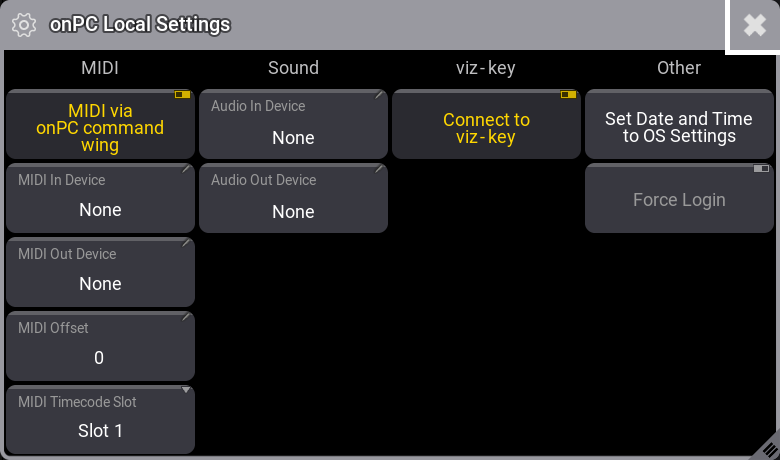
MIDI
-
MIDI via onPC command wing: To enable or disable MIDI from grandMA3 onPC command wing.
If disabled, the device configured in MIDI In Device and MIDI Out Device is used.
If enabled, the command wing MIDI and the device configured in MIDI In Device and MIDI Out Device are used. - MIDI In Device: This opens a pop-up with possible MIDI devices. Tap one to select it.
- MIDI Out Device: This opens a pop-up with possible MIDI devices. Tap one to select it.
- MIDI Offset: This opens the calculator. For more information, see MIDI Remotes.
- MIDI Timecode Slot: Adjusts the MIDI Timecode Slot.
Sound
- Audio In Device: This opens a pop-up with possible Audio devices. Tap one to select it.
- Audio Out Device: This opens a pop-up with possible Audio devices. Tap one to select it.
viz-key
- Connect to viz-key: Enabled, to attach the viz-key dongle to the onPC.
- Connect to viz-key: Disabled, to attach the viz-key dongle to a visualizer that is running on the same computer as the onPC.
Other
- Set Date and Time to OS Settings: Resets the date and time of the grandMA3 onPC application to the date and time of the operating system.
- Force Login: Forces the user to enter a password after starting up the grandMA 3 onPC application.