DMX Priorities
|
grandMA3 User Manual » DMX In and Out » DMX Priorities
|
Version 2.4 |
Multiple DMX sources can affect values to the same parameter, and the console resolves competing values using the following source priority order, followed by output modifiers and selection overrides.
DMX Data Source Priorities
-
External input sources like sACN, Art-Net, DMX In, and PSN.
- DMX Tester.
- Parked values.
- Playbacks with Super priority.
- Programmer (Freeze enabled).
-
Standard playback priorities.
- Swap
- HTP
- Highest
- High
- LTP
- Low
- Lowest
- Programmer (Freeze disabled).
Merge Behaviors
1. HTP: Highest dimmer value takes precedence.
2. LTP: Latest attribute value takes precedence.
Output Modifiers
1. Grand Master
2. World Masters
3. Group Masters
Selection Overrides
1. Highlight
2. Lowlight
3. Solo
Explanation of Each Layer
1. External Input Sources (sACN / Art-Net / PSN / DMX In)
External inputs like sACN, Art-Net, and DMX In take the highest priority depending on how they are merged in. Their behavior depends on Merge Mode and Input Priority.
Merge Mode includes Prio, HTP, LowTP, and Off.
Input Priority includes Super, Prog, Highest, High, LTP, Low, and Lowest.
For more information see DMX Port Configuration.
PSN continuously injects position data and behaves like a high-priority position source depending on the merge setting of the universe the linked MArkers are patched to.
For more information see PSN.
2. DMX Tester
Overrides almost everything on the console. Used for troubleshooting and direct address output. DMX Tester takes priority over programmer, playbacks, and parked values.
For more information see DMX Tester in the DMX Sheet topic.
These values are kept until the DMX Tester is cleared using the command line or the Tester Encoder Bar.
3. Parked Values
Hard locks a DMX value until Unpark is used. Often used for: Work lights, stuck channels, protecting dimmers.
For more information see Park Keyword.

|
Hint: |
| Parked fixtures will still respond as normal in layout views even though their DMX output is parked |
|
|
Hint: |
| Highlight, Lowlight, and Solo, will not affect parked values |
4. Playbacks with Super Priority
Special playback priority that overrides other playbacks and programmer. Often used for strobes, bumps, emergency looks.
|
|
Hint: |
| Highlight, Lowlight, and Solo take priority over a super playback. Highlight, Lowlight, and Solo affect output at the selection level and can override playback values, but do not override parked values. |
5. Programmer (Freeze enabled)
When Freeze is enabled, the programmer behaves like a standard LTP layer and can be overridden by Super-priority playbacks. This prevents most played back cues from overriding programmer values.
For more information about Freeze, see Freeze keyword.
6. Standard Playbacks
Sequence options. For more information see Sequence Priorities.
Playback priority types:
| Priority | Typical Use |
| Swap | Temporary bump / solo |
| Highest | Highest priority among playbacks |
| HTP | Dimmer playbacks |
| High | Higher LTP layer |
| LTP | Standard playback |
| Low | Background looks |
| Lowest | Lowest priority among playbacks |
7. Programmer (Freeze Off)
This is the default programmer behavior. Has roughly the same priority level as normal playbacks. Can be overridden by cues depending on attribute logic.
Merge Behaviors
1. HTP: Highest dimmer value takes precedence.
2. LTP: Latest attribute value takes precedence.
For more information about HTP and LTP see Sequence Priorities.
Output Modifiers
1. Grand Master
Global intensity limiter across the show. Grand Master values are applied after data is calculated but before DMX output. For more information see Grand Master.
2. World Masters
Dimmer master for the selected world. For more information see World Master.
3. Group Masters
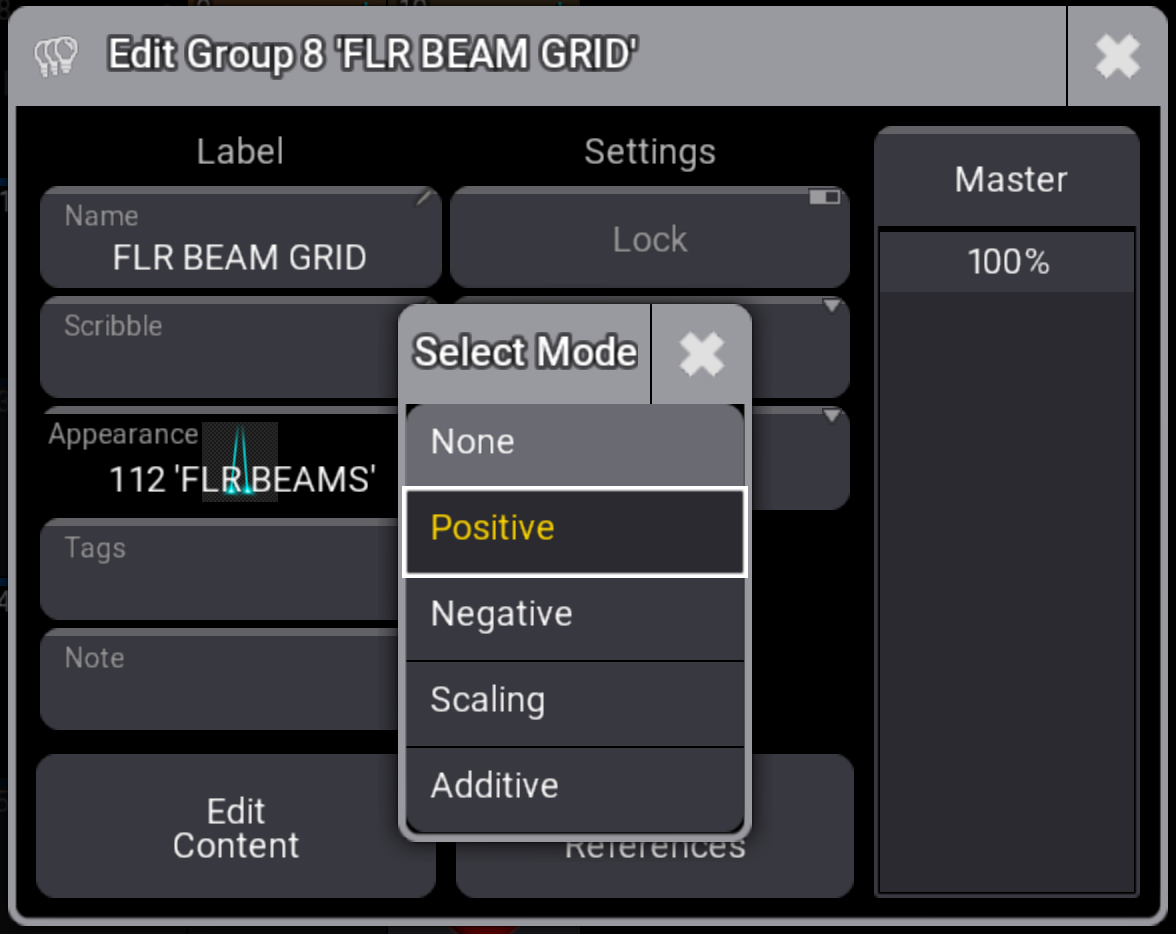
Dimmer masters for fixture groups. Typically used for: Busking, zone control, blackout layers.
Group Master Modes can affect output.
|
|
Hint: |
| Negative, Positive, and Scaling modes have a higher priority than Highlight. |
Selection Overrides
Selection overrides temporarily modify output for selected fixtures and take precedence over playback values, but do not override parked values.
1. Highlight
2. Lowlight
3. Solo
For more information see Highlight, Lowlight, Solo
|
|
Hint: |
| Highlight has priority over other values in the programmer. |
|
|
Hint: |
| Solo takes priority over all playbacks. |