The Programmer
|
grandMA3 User Manual » Operate Fixtures » The Programmer
|
Version 2.4 |
The programmer is a temporary memory location where edited values are placed. The values can then be stored or released.
Every user profile has a programmer.
The programmer has three levels:
- Selected fixture
- Active programmer values
- Deactivated programmer values
The programmer's values usually affect the system's output. However, there is a Blind function that allows hiding the programmer's values from the output.
Selected fixtures will be affected by encoder input or command line entries. For example:

|
User name[Fixture]>Fixture 1 At Preset 2.1 |
For more information, see Encoder Bar.
Active and deactivated programmer values can affect the output, but only active values will be stored. For more information, see Store Options.
Selected fixtures can be identified by a yellow name and ID text. The Fixture Sheet colors for active attribute layers are explained in detail in the System Colors topic.
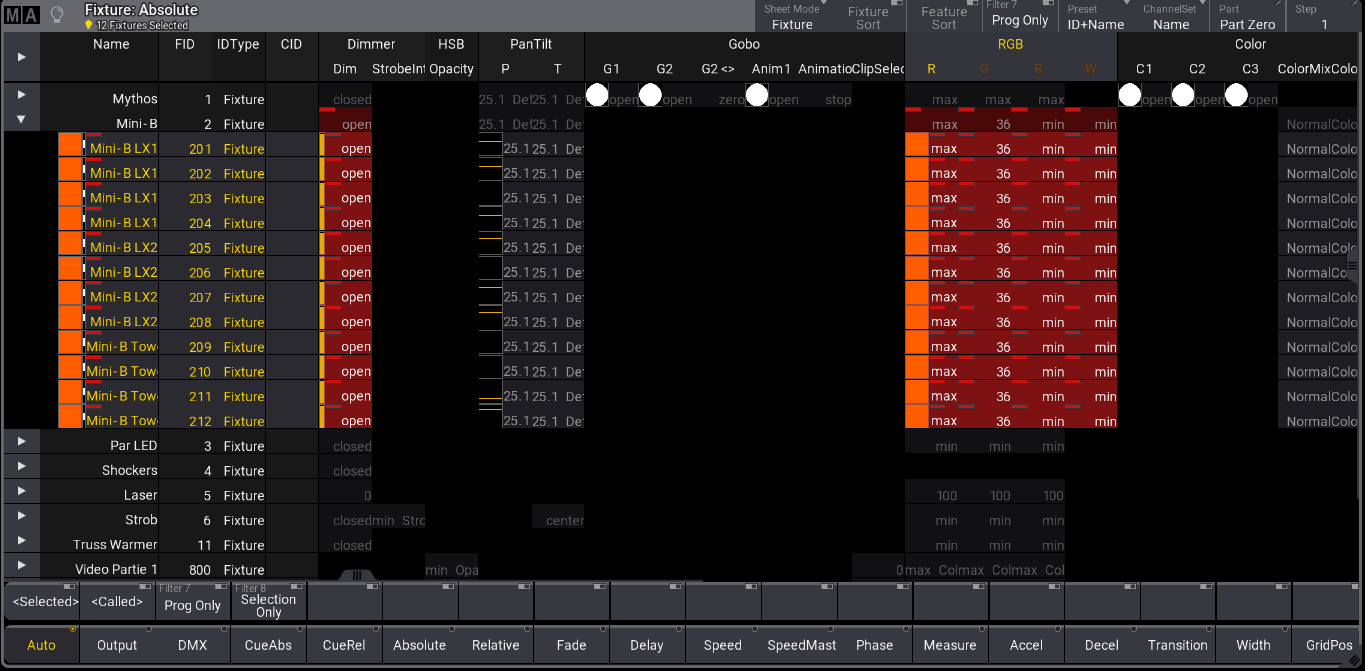
Values in programmer
To activate all attributes for the selected fixture, press Please twice to load all current values into the programmer. Press Please once more to deactivate the attributes.
To remove a value from the programmer, press Off, then tap the value to remove it. For more information, see KnockOut. Feature groups can also be released from the programmer by tapping Off and the encoder bank button. For more information, see Encoder Bar.
To clear the programmer, tap Clear. There are three levels to this command:
- The first press of Clear will deselect the fixtures. This action will not affect the output; active values can be stored according to the store settings. See Store Settings and Store Preferences.
- The second press of Clear keeps the values in the programmer, but as deactivated values. This action will not affect the output. Storing a cue at this point will result in an empty cue since all values are deactivated.
- Press Clear a final time to clear the programmer and release all the values.
Completely clearing the programmer can also be done by holding Clear for more than one second.
The associated keywords are Clear, ClearSelection, ClearActive, and ClearAll.
The Clear button in the At Filter pop-up executes the Clear command. For more information, see Control Bar.
Freeze
By default, the played back sequences have a higher priority than the programmer. That means the programmer's values can change if a running sequence has stored values for the exact attributes. To give the programmer a higher priority than the played back sequences, enable Freeze to keep the adjusted values in the programmer even when the sequence runs.
Blind
Blind is a function that hides the programmer's values from the output. The blind mode can be toggled on and off by pressing Blind or using the Blind Keyword.
Turning on blind mode with no values in the programmer does not change the output. Changing values while in blind mode does not affect the output. If the programmer is cleared before leaving the blind mode, then the output is not affected. Leaving blind with programmer values will add these values to the output. Entering blind mode with values in the programmer removes them from the output, so the output changes.

|
Important: |
| Program Time will not be respected when entering or exiting Blind mode. |
Program Time
The programmer's value changes are usually made immediately. However, the Program Time function can use a timed or manual fade.
Preview
In preview mode, the user can enter values in a separate programmer without generating output on the stage.
The preview programmer behaves the same as the live programmer. There is one preview programmer in a session.

|
Warning:
When multiple users work in a session, be aware that everyone uses a single shared preview programmer. As a result, a user can modify another user's values in the preview programmer. |
For more information, see Preview.