|
grandMA3 User Manual » Recipes
|
Version 2.4 |
Recipes can be a very useful tool for touring shows or when the changes are expected.
Recipes can be stored in cue parts and presets.
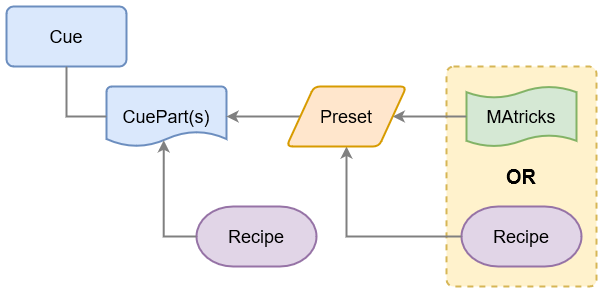
There is a possibility to create some conflicting data using recipes and stored values in both cue parts and in presets.
Values can be stored in a cue part. Cue parts can also contain recipe data.
The cue part recipe needs to be cooked into the cue part. If this is cooked with the "Merge" option then existing values in the cue part are not overwritten by the recipe. If the "Overwrite" option is selected, then all existing values are overwritten by the recipe - values that are not affected by the recipe are removed from the overwritten cue.
Preset recipes are automatically cooked into the preset, and a preset can be used in a cue part.
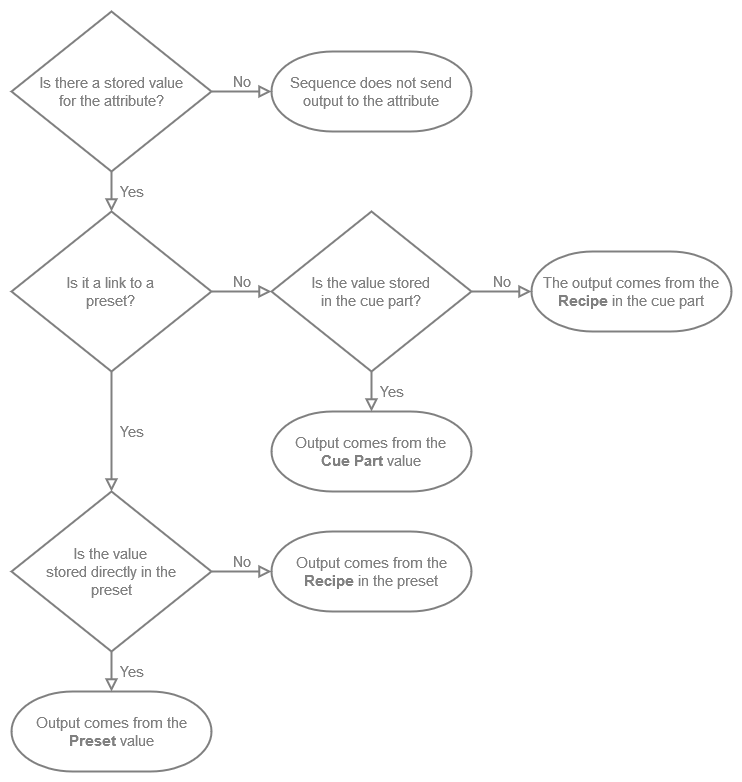
All this means that an attribute can potentially get a value from four different locations, but only one of these values can be output:
- The cue part
- The cue part recipe
- The preset
- The preset recipe
Values stored in the cue part have higher priority than the cue part recipe value. Values stored in the preset have a higher priority than the preset recipe values. Storing a preset to a cue part creates the preset reference to the preset so in that case the output is decided by the preset priority.
This flow chart can be used to determine where the output comes from in a sequence:
A recipe contains one or multiple recipe lines describing what should happen based on a set of information.
The recipe can "cook" values into the cue part, preset, or programmer. This cooked data is marked by a small
pot icon  and
the cooked data can easily be removed again if needed.
and
the cooked data can easily be removed again if needed.
A recipe line can contain information about a selection of fixtures, group, preset, MAtricks, individual fade, delay, speed, and phase values.
Values from recipes can be combined with conventionally stored values.
The flexibility in the recipe system allows for a variety of uses. The recipes could be used to:
- Create recipe presets for groups referencing other presets for a flexible fixture setup.
- Create template presets with ranged values that can be applied to a flexible selection of fixtures.
- Cues that contain a recipe on how different elements create the desired look.
If a recipe is present in a cue, then there is a small pot icon. It is an indicator for the most recent running cooking process:
 Green pot: The most recent cooking process including all its recipe lines was successful.
 Red pot: At least one recipe line of the most recent cooking process did not cook.
 Open
pot: This is a standard recipe template.
Open
pot: This is a standard recipe template. Open violet pot: This is a phaser recipe template.
 Orange pot: After the most recent cooking process, there is data from recipes (cooked) and uncooked data in the cue or cue part.
  Violet pot: This is a phaser recipe.
The grandMA3 software offers multiple tools and methods to create and edit recipes. Read the Cue Recipe and Preset Recipe topics for details on how to create and edit recipes directly in cues and presets. Additionally recipes can be created with the programmer, the Recipe Editor Window, and the Edit Recipe Mode.